
Wix, Squarespace, or Resto1.Click: Which Is Best for a Restaurant?
Resto1.Click is the fastest and most purpose-built solution for a standard restaurant in 2026. Wix and Squarespace are powerful general-purpose tools, but they require 2–4 weeks to set up and cost €15–€33/month without native restaurant features. This comparison helps you choose based on your actual situation.
The 3 Options at a Glance
| Wix | Squarespace | Resto1.Click | |
|---|---|---|---|
| Built for restaurants | No (general-purpose) | No (general-purpose) | Yes |
| Price | €17–€29/mo | €23–€40/mo | Free / €19/mo |
| Time to launch | 2–4 weeks | 2–4 weeks | 10 minutes |
| Skills required | Moderate | Moderate–advanced | None |
| Native structured menu | No (third-party widget) | No (text blocks) | Yes |
| Google Reviews built-in | Paid app (€9–€25/mo extra) | Custom code | Yes (Pro plan) |
| Schema.org auto-markup | No (manual) | No (manual) | Yes |
| Performance (Lighthouse) | 60–75 | 70–85 | 95+ |
Setup Time: The Biggest Difference
On Wix or Squarespace, “a few hours” actually means 2–4 weeks for a beginner. You need to choose from hundreds of templates, learn the drag-and-drop editor, structure the content, set up the menu manually (it’s not native), check mobile responsiveness, and fill in every SEO field.
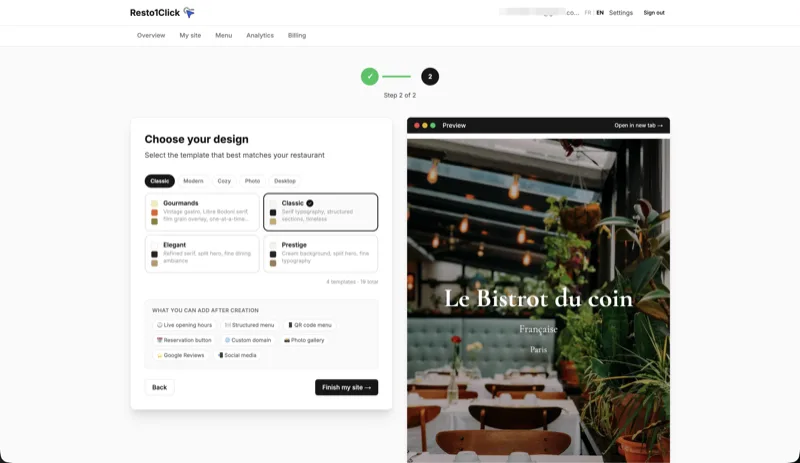
With Resto1.Click, the restaurant structure is already there. You fill in your information and pick a style. You’re live in 10–15 minutes — from your smartphone, tablet, or computer.
Menu Management: The Critical Point
The menu is the core content of a restaurant site. Here’s how each solution handles it:
Wix: The menu isn’t a native feature. You install a third-party widget or build it manually with text blocks. Every update takes 5–10 minutes in the editor.
Squarespace: Same approach — text blocks, no native structured menu.
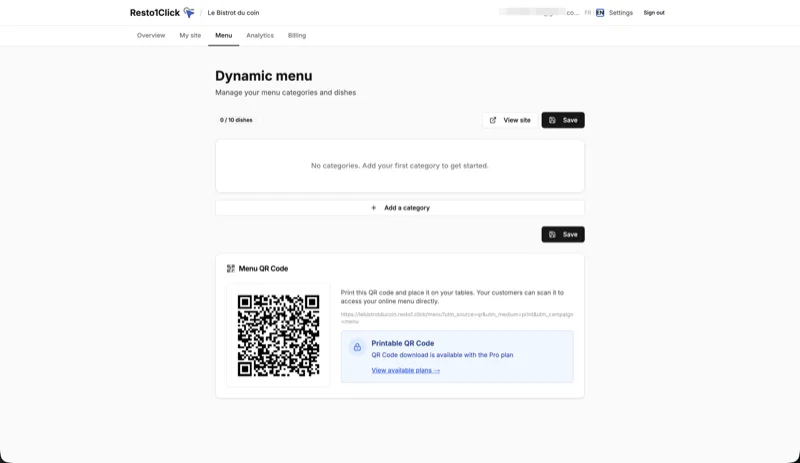
Resto1.Click: The menu is built in. You manage categories and items through a dedicated form. A price change takes 30 seconds from the dashboard. Mobile display is automatic.
SEO and Performance
Schema.org markup: Google uses this to understand that a site is a restaurant (cuisine type, hours, dishes, location). On Wix and Squarespace, you have to add it manually through code. Resto1.Click generates it automatically (Restaurant, MenuItem, OpeningHoursSpecification).
Page speed: Wix sites are known for being heavy (Lighthouse scores often between 60 and 75). Squarespace is better but still below modern standards. Resto1.Click is built on Astro 5 with automatic WebP compression and a global CDN — consistently scoring 95+, which is a direct Google ranking factor.
Free vs. Pro on Resto1.Click
| Feature | Free | Pro (€19/mo or €15/mo billed annually) |
|---|---|---|
| All templates | ✅ | ✅ |
| Menu | ✅ 10 items | ✅ Unlimited |
| Google Reviews | ❌ | ✅ |
| Downloadable QR code | ❌ | ✅ |
| Custom domain | ❌ | ✅ |
| Analytics | ❌ | ✅ |
| Reservation button | ❌ | ✅ |
| No watermark | ❌ | ✅ |
| Free trial | — | 14 days |
Who Should Choose What?
Choose Resto1.Click if:
- You want to be online fast (10 minutes, not 4 weeks)
- You have no technical background
- You run your restaurant from your smartphone
- You want a structured menu, Google Reviews, and a QR code without extra effort
- Your priority is Google visibility (automatic SEO)
Choose Wix if:
- You need full design freedom (place every element exactly where you want)
- You need advanced features (e-commerce, complex blog, built-in reservations)
- You have time to learn the platform (allow 2–4 weeks)
Choose Squarespace if:
- You want the most premium design on the market
- You’re willing to pay €23–€40/month and invest the time
- You want to sell products online (gift cards, merchandise)
Resto1.Click’s Honest Limitations
- Limited customization: you choose the template and content, but don’t edit HTML/CSS
- No e-commerce: to sell online, you’ll need to link to an external solution
- Newer platform: Wix and Squarespace have 15+ years of history; Resto1.Click has been live since 2024
For 90% of independent restaurants (diner, pizzeria, bistro, food truck), none of these limitations matter in practice.
Practical Advice
Try Resto1.Click first — it’s free, takes 10 minutes, and works entirely from your smartphone. If after a few weeks you need more design flexibility, migrating to Wix takes 1–2 hours (export your menu, rebuild on Wix). The reverse — starting on Wix and then migrating — costs you weeks of work.
Going further: also read our BentoBox vs Resto1Click comparison and our clarification on Resto1Click vs RestoClic to avoid mixing the two up.
Try Resto1.Click for free, no commitment.
→ Create my restaurant website
✓ Live in 10 minutes ✓ From your smartphone ✓ No technical skills required ✓ Free forever (basic plan)